VLM
简介
VLM是什么
视觉语言模型(Vision Language Models,VLMs) 能够同时理解图像和文本,从而完成Image Captioning、VQA,以及Multimodal Reasoning等任务。
与LLMs类似,VLM 的训练目标也是预测下一个 Token,但它额外具备处理视觉信息的能力。
一个典型的 VLM 通常由以下三个核心模块组成:
Image Encoder: 提取图像中的视觉特征。Projection Layer: 将视觉特征映射到与文本特征相同的表示空间,实现视觉与语言的Alignment。Language Model: 负责理解文本或生成文本输出。
这种结构使模型能够建立视觉元素与语言概念之间的联系。
根据不同的应用场景,VLM 可以采用不同的配置。Base Models用于通用的视觉-语言任务,Chat-Optimized variants支持多轮对话交互。部分模型还集成了额外的组件,用于将模型预测与图像中的视觉证据进行关联(grounding),或针对目标检测等特定任务进行专门优化。
最新趋势
为语言模型赋予视觉理解能力,开辟了许多令人兴奋的发展方向,包括:
- Reasoning-focused VLMs:利用视觉输入解决复杂的推理问题。
- Vision-Language-Action Models,VLA:能够根据视觉和语言输入生成可执行的动作,广泛应用于机器人控制等场景。
- Agentic VLMs:支持更复杂的工作流,例如与文档进行对话、通过屏幕截图操作计算机等。
- Any-to-Any Models:突破视觉和文本的限制,能够处理多种输入和输出模态,包括文本、图像、音频、视频等,实现更加通用的多模态交互。
- Specialized VLMs:针对特定任务进行优化,例如目标检测、图像分割以及文档理解。
架构概览
VLM 将图像处理模块与文本生成模块结合起来,实现统一的多模态理解。其主要组成部分包括:
- Image/Vision Encoder:将图像转换为紧凑的数值表示(特征向量)。常见模型包括 CLIP 和 SigLIP。
- Embedding Projector:将图像特征映射到与文本嵌入相同的表示空间(通常是一个小型 MLP 或线性层,并针对多模态任务进行微调)。
- Multimodal Projector / Fusion Module:融合视觉和文本表示,并增强两者之间的联系。这一步不仅仅是简单对齐,而是实现丰富的跨模态交互。
- Text Decoder:根据融合后的多模态表示生成文本(或其他输出)。
Qwen2.5-VL架构示例:
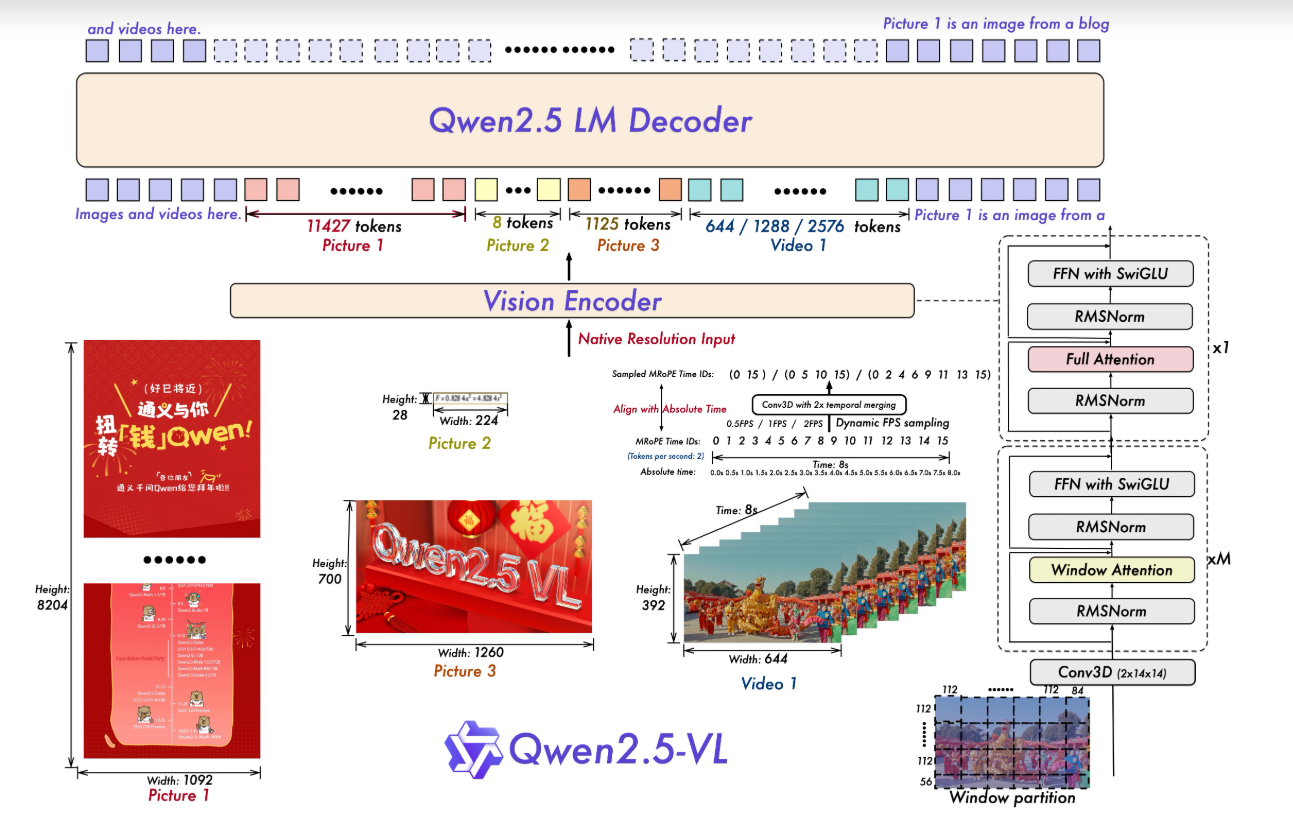
大多数 VLM 都采用预训练的图像编码器和文本解码器,然后利用图文配对数据集进行微调,以提高训练效率和模型的泛化能力。
代码使用
Chat Format
许多 VLM 支持 chat-like interactions, 其消息通常采用以下结构:
- System message: sets context:
"You are an assistant analyzing visual data." - User queries: combine text and images.
- Assistant responses: generated text based on multimodal analysis.
示例:
1 | [ |
此外VLM 还支持多张图片或视频帧序列作为输入,只需按照相同的 Chat 模板传入多个图像即可。
方式1-Pipeline
1 | from transformers import pipeline |
Output :
1 | The image depicts a close-up view of a flower garden, specifically focusing on a pink flower. The flower is the central subject of the image, and it is a prominent feature due to its vibrant color and intricate details. The flower has a circular shape, with petals that are slightly curled and have a gradient from light to dark pink. The petals are arranged symmetrically around the central pistil, which is visible in the center of the flower. The pistil is a small, yellow structure that is surrounded by a cluster of stamens, which are visible as small, yellow structures. The flower also has a small, black |
方式2-Transformers
如果需要更灵活地控制模型,可以直接通过Transformers加载 VLM。为了减少显存占用并提升推理效率,可以使用 bitsandbytes 进行 4-bit Quantization。
与传统 LLM 不同,VLM 使用的是 Processor 而不仅仅是 Tokenizer。
Processor 同时负责:
- 文本 Tokenization
- 图像预处理(Resize、Normalize 等)
从而统一处理多模态输入。
1 | import torch |
示例: Describe an Image
我们可以借助 Chat Template 来完成图片描述任务。在消息中,每张图片使用s{"type": "image"} 进行占位,而真正的图片数据则通过 images 参数传递给 Processor。Processor 会自动完成文本和图像的联合处理。
1 | # Load image |
Output:
1 | The image is of a bee on a flower. |
Processor 会自动融合文本和图像输入,使模型能够生成连贯且符合上下文的多模态输出。
相同的 Chat Template 不仅适用于单张图片,还可以轻松扩展到Multi-image、OCR、Video Frames